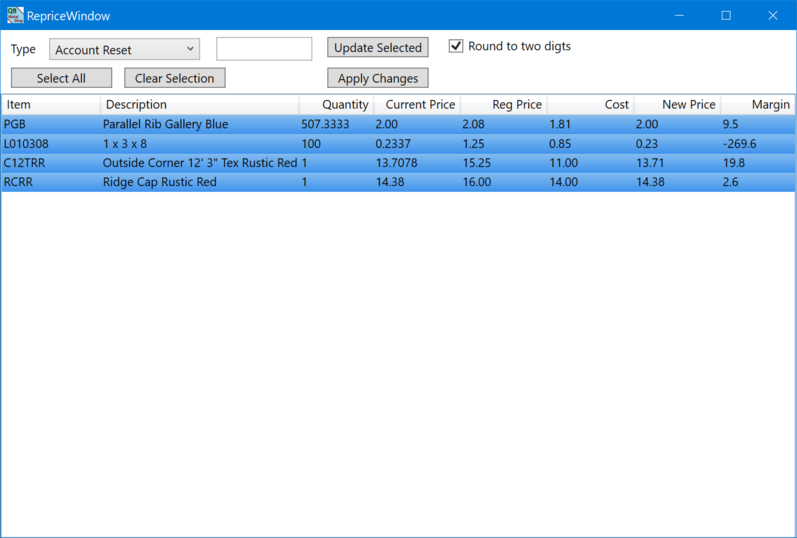
To reprice an order click the reprice button beside the selected customer.
The list show all the items from the order with all of them selected. You can select one or more items to reprice. The current price column show the price prior to repricing. The New Price column shows the price after repricing. The Margin column shows the new margin resulting from the price chnages.
1. Select the items to reprice
2. Select the type of adjustment.
a. Account Reset, resets the pricing to the default for the selected customer
b. Gross Margin %, adjusts prices based on cost resulting in the selected margin.
c. Cost Markup %, calculates the price by adding a markup percentage to the item cost.
d. Retail Price Discount %, calculates a discount off of regular price.
e. Current Price Discount, calculates a percentage discount off of the current price.
f. Acount Price Discount, calculates an additional discount percentage after calculating the customer price.
g. New Price, allows you to enter a New Price manually.
h. Subtotal Amount, calculates a new price for ALL ITEMS using the a percentage adjustment on to current price to make the order subtotal be the specified amount.
3. Press 'Update Selected' to update the price for selected items.
4. Repeat steps 1 to 3 until the prices for all items are as desired.
5. Press 'Apply Changes' button to copy the new prices to the order.
NOTE: Closing the window without applying changes will discard all price changes.