The order search pane is used to quickly look up orders, using the filters. This view is also useful for reviewing the status of multiple orders.
Filters
Any combination of filters can be used to narrow down the results of the orders list. New users tend to scroll through the entire list instead of applying filters. The filter fields are like a search field. For example: if you are searching for a customer you may need to only enter the first few letters of the customer's last name. Then the orders for that customer could be further filtered by PO or date etc.
The clear filters button is used to clear all the filter fields at once and again display the entire list.
The 'Hide Shipped' checkbox filters out all orders that have already been shipped, so only open orders are shown.
Status
The status column shows the progress for an individual order. The status colors correspond to the indicators for the individual lines.
Totals
A summary at the top shows the total number of orders selected as well as the sum of all orders. This can be useful to check sales history for a particular customer. When analyzing sales for multiple customers it is be better to use the Customer Sales or Items Salesreports.
Rearranging the list
The columns widths can be resized. The columns can also be reordered by clicking on a column header and dragging it to a new location. The column sizing and order will be remembered next time the app is opened.
5. Show Order in QuickBooks
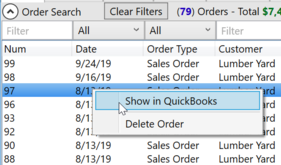
Right click on a transaction and select 'Show In QuickBooks', or simply double click a transaction. The transaction will be displayed in QuickBooks if QuickBooks is open. If this feature does not work or continues to give errors even when QuickBooks is open you will need to contact support. In order for this feature to work, the QuickBooks SDK needs to be installed on each computer where this feature is utilized.
6. Delete Sales Order or Estimate
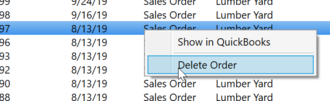
To delete an order right click an order and select 'Delete Order' from the context menu.