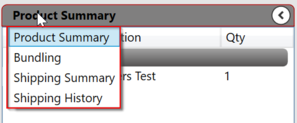
The left pane can show one of four different views. You can change the view by clicking the header and selecting your choice. Your chosen selection will be remembered next time you start the app.
Product Summary
The Product summary shows a consolidated list of all items on the order. Items are sorted and grouped by item category.
The product summary can also be used to schedule multiple items for production at once.
Bundling
Bundling is also available in the Shipping tab. Is is explained in detail in the Bundling Section.
ShippingSummary
The shipping summary view shows a list of orders to be shipped. These orders are grouped by date. Clicking on a date will expand or collapse the group to show all the orders to be delivered that day. Clicking on an order in the list loads it in the order editor. You can expand or collapse all dates at once by clicking on the column headers.
Shipping History
The shipping history is similar to the Shipping Summary, but it shows orders that were shipped in the last 30 days. This same information is also available on the Shipping tab.